Visual Stories
Tata Play | UI/UX Designer

Project Background
MyJio functions as a super-app with multiple mini‑apps (JioMart, JioGames, JioSaavn, JioFiber, etc.). However, users often struggled to discover these features beyond recharge. The team identified a need for a more engaging, visual layer to highlight what’s new and drive engagement.
Project Details
We conceptualised a Stories feature inside MyJio - similar to Stories in Instagram or WhatsApp, but designed for a super‑app. These Stories would be lightweight, visual, and contextual entry points linking directly into relevant mini‑apps.
My Roles & Responsibilities
As the UI/UX Designer for this project I was in charge of:
Driving the end-to-end design process: from research synthesis and competitive benchmarking to ideation, information architecture, and user flows.
Designing wireframes, interaction models, and high-fidelity UI aligned with the Jio Design System, while ensuring scalability across mini‑apps.
Building clickable prototypes in Figma to demonstrate user journeys and facilitate stakeholder walkthroughs and alignment.
The Key Problem
How might we surface relevant offers and features at the right time to increase engagement and cross-sell opportunities?
Why we chose to address this problem:
MyJio users primarily viewed the app as a recharge utility. The dashboard was static, cluttered, and non-personalised - causing limited engagement with the broader ecosystem of services. Without a proactive discovery mechanism, new features and offers went unnoticed, leading to underutilisation of MyJio’s full potential.
The Solution
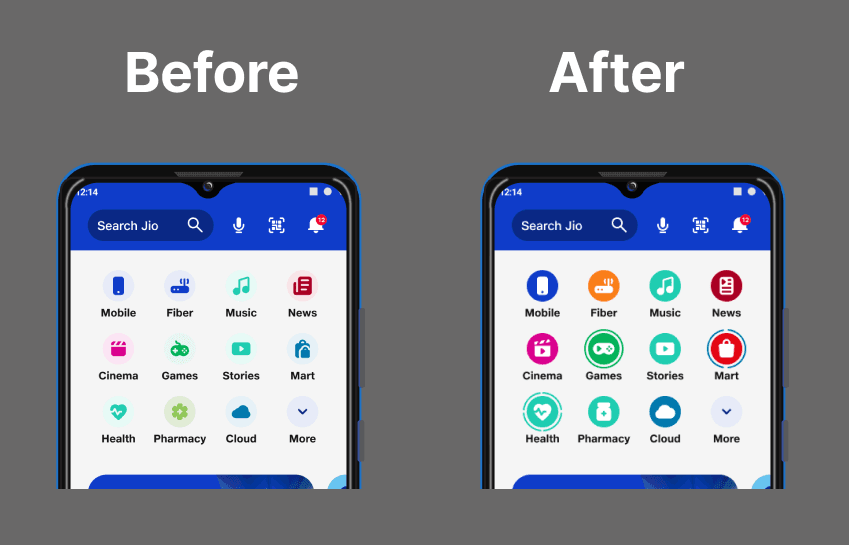
We designed Visual Stories - a lightweight, scannable, and interactive layer on the MyJio dashboard - addressing the challenge of low discovery and static engagement. By surfacing timely updates, offers, and mini-app features through deep-linked, story-like cards, the dashboard evolved into a dynamic discovery surface that encouraged exploration without overwhelming users.
Key User Flows
Our main user flows are:
Home to Mini-app Story Flow
User opens MyJio app and lands on the homepage.
Stories rail highlights multiple mini-apps (e.g., JioMart, Music, Games).
User taps on JioMart story icon.
Story Viewing Flow
JioMart has 2 active Stories showcasing offers and updates.
User can tap through, skip, or hold to pause.
Each story has contextual CTAs (e.g., “Shop Now”).
Skip & Redirect Flow
If user taps “Skip,” they are redirected to the JioMart landing page inside MyJio.
Re-entry Flow
On the JioMart page, user can re-open Stories anytime by clicking on the JioMart logo at the top navigation bar.
Brainstorming
Primary Research:
Insights from 2 months of MyJio usage data (April–May 2023):
Discovery was heavily skewed towards JioTunes, Recharge, and JioCare, while other services were underutilised.
Click-through data highlighted the need for a proactive and engaging discovery mechanism.

Competitive Analysis
Gojek: Gamified discovery via Explore hub

Airtel: Stories for feature promotion

Swiggy: Bite-sized offers and action hooks

WhatsApp: Status for lightweight updates

Concept Exploration
We tested two design options using Maze to validate the Stories concept. Below are the pros and cons captured from the sessions:
Option 1 - App Specific Stories
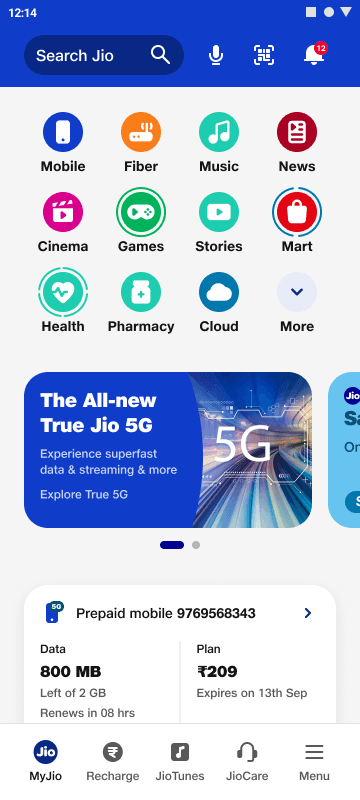
Pros:
User can see updates of specific apps they want to follow.
Provides a quick gist of what a mini-app has to offer.
Easy to skip stories → convenient experience.
Less development effort, minimal extra real estate required.
Cons:
Content repetition (inside app vs story view).
Discovery feels more effective inside the mini-app than outside.
Lack of clarity: clicking may open story or the app itself.
Replay not intuitive if user wants to see the story again.
Apps hidden under “More” section remain undiscovered.
Visual risk: micro-animations/icons may not look good with random 4–5 apps.
Option 2 - Centralised Stories Hub

Pros:
Universal place to promote any mini-app offerings or updates.
Users don’t need to search across mini-apps for offers.
Flexible display duration (24 hrs to 1 week).
Direct deep-link into mini-app actions.
Ability to showcase upcoming offers and seasonal deals at one go.
Rewards and promotions across mini-apps in one view → increases discoverability.
Skippable, saving user’s time.
Single rail highlights all mini-apps → higher visibility.
Cons:
Takes additional space on the Home dashboard.
Mini-app icons may need shifting based on active offers.
When fewer offers exist, space could feel underutilised.
Key Features
The Visual Stories feature introduced several key elements to enhance discovery and engagement, focusing on App-Specific Stories as the chosen direction:
Mini-app Stories on Home:
Each mini-app (like JioMart, Music, Games) appeared on the homepage with its own story bubble.
Users could directly access the latest updates for a specific mini-app by tapping its story.
Reduced noise by keeping stories tied to relevant services only.
Skippable Visual Story Viewer
Stories followed familiar interactions: tap to advance, hold to pause, skip to exit.
Visual storytelling lowered cognitive load and encouraged quick comprehension.
Stories were time-bound, ensuring freshness and relevance.
Actionable CTAs:
Each story frame was tied to a clear primary CTA.
Deep-links took users directly to the specific screen or action in the mini-app (e.g., recharge checkout, JioMart cart, game play).
Reduced friction from discovery → action in just one tap.
Re-entry from Mini-app Logo:
On each mini-app’s landing page, users could re-open its Stories by tapping the app logo.
Gave users freedom to revisit updates even after skipping.
Expiry & Freshness Model:
Stories auto-expired after 24 hours or a defined campaign period.
Ensured content stayed timely and prevented user fatigue.
Cross-promotional Opportunities:
Within an app-specific story, users could be nudged to try out offers, bundles, or linked services.
Improved awareness and engagement for underutilised mini-apps.
Visual/UI Design
The design language for Visual Stories was built on top of the Jio Design System, ensuring consistency with the broader MyJio ecosystem while introducing new, stories-specific patterns for motion, storytelling, and actionability.
Our focus was on making the experience:
Lightweight and familiar → Borrowing interaction cues from global story formats.
On-brand → Maintaining Jio’s visual identity across typography, color, and iconography.
Scalable → Creating reusable components that could extend across multiple mini-apps.
Components:
To ensure scalability, we first designed the building blocks of the stories ecosystem—cards, navigation patterns, progress indicators, and action buttons.
These wireframe-level components acted as a system foundation, making it easier to scale the design across different mini-apps while staying consistent.

Final Screens
Once the foundations were set, we brought them together into polished high-fidelity screens.
The final UI balanced Jio’s brand language with lightweight, familiar interactions, creating a seamless experience that fit naturally inside MyJio while still feeling fresh and engaging.


Live Prototype
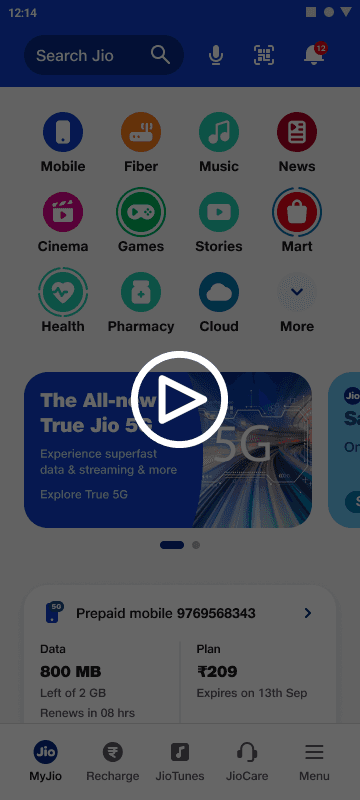
Stories are not static—they are driven by motion and micro-interactions.
We designed motion patterns for:
Auto-progression between stories
Tap/hold gestures for navigation
Smooth transitions across mini-apps
The live prototype demonstrates how motion elevated the experience from static screens to an interactive storytelling layer within MyJio.
Takeaways
Working on the Visual Stories project taught me more than just creating engaging UI—it was about balancing innovation with scalability. While we introduced new patterns for storytelling and motion, every decision had to align with Jio’s broader design system and business goals.
Some key reflections from the project:
Designing for scale → Building components that worked not just for one story, but across multiple mini-apps, was a major learning in creating reusable and adaptable systems.
Motion as meaning → Motion wasn’t just an aesthetic layer; it became a tool to guide attention, communicate hierarchy, and keep the experience lightweight.
Cross-functional collaboration → Partnering closely with product, business, and tech helped me think beyond just design intent, and deliver something that could be implemented at speed and scale.
This project strengthened my ability to design systematically yet creatively, and it reinforced the importance of tying every design detail back to user needs and business impact.